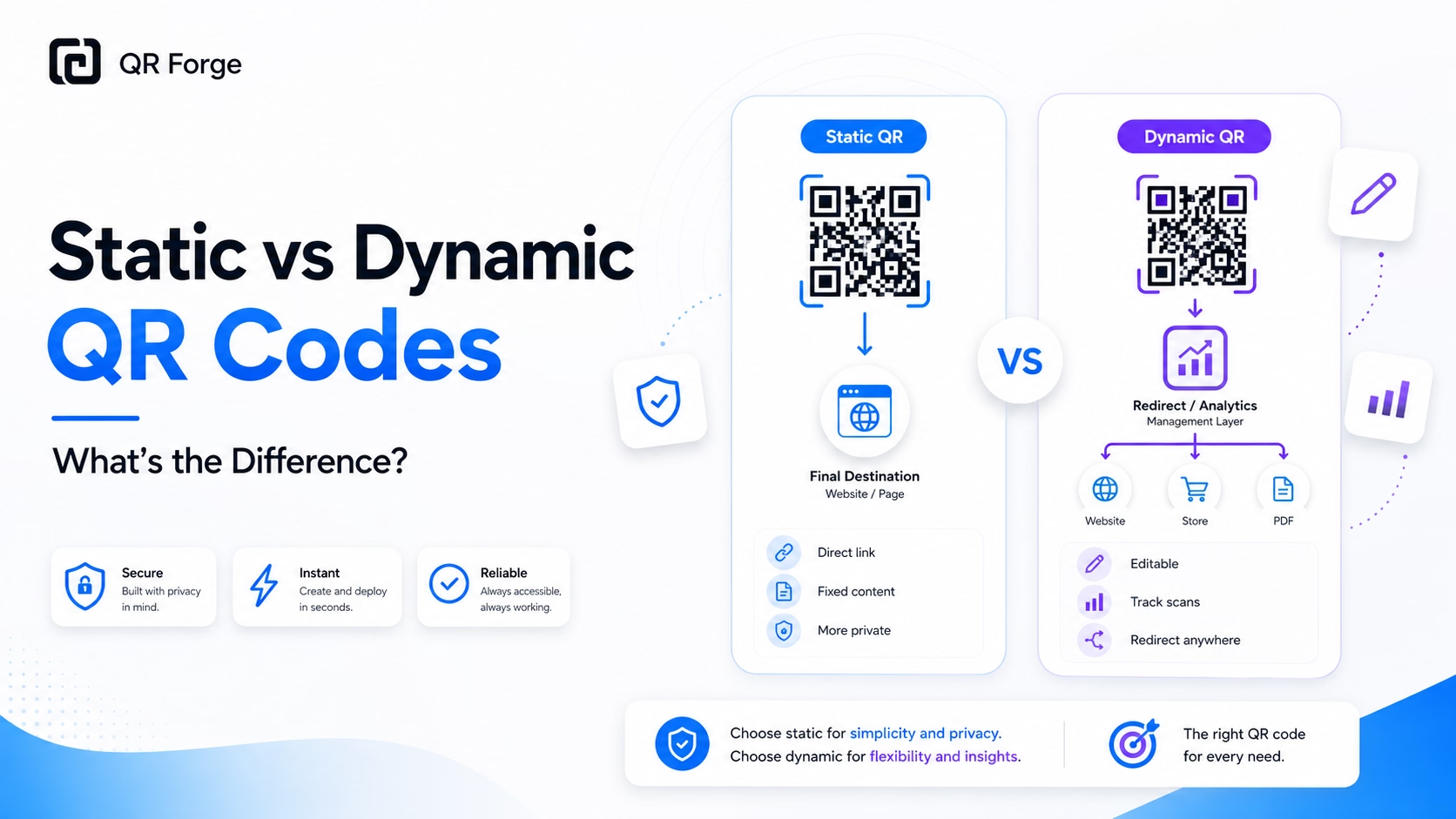
Static and dynamic QR codes look almost the same after they are generated. Both can be scanned by a phone camera. Both can open a website, share information, or connect people to a digital action.
The real difference is not how they look. The difference is what happens after someone scans them.
A static QR code stores the final data directly inside the QR code. A dynamic QR code usually stores a redirect link that sends the scanner through a server before opening the final destination.
Create a free static QR code
Use QR Forge to generate privacy-first static QR codes for URLs, text, WiFi, contact cards, and more.
Quick comparison
Static QR codes are best when you want a simple, permanent, privacy-friendly QR code. Dynamic QR codes are best when you need to edit the destination later or track scan activity.
Static QR code summary
A static QR code stores the real content directly inside the QR pattern. If the QR code contains a website URL, that URL is encoded into the QR code itself.
This makes static QR codes simple and direct.
Dynamic QR code summary
A dynamic QR code usually stores a short redirect URL. When someone scans it, the redirect service decides where to send the user.
This makes dynamic QR codes more flexible, but also more dependent on a third-party service.
What is a static QR code?
A static QR code is a QR code where the final data is built into the code itself.
For example, if you create a static QR code for a website, the website URL is encoded directly into the QR pattern. When someone scans the QR code, their phone reads that URL and opens it.
What static QR codes can store
Static QR codes can store many common types of data:
- website URLs
- plain text
- WiFi credentials
- contact details
- email actions
- SMS actions
- phone numbers
- map locations
Why static QR codes are direct
Static QR codes do not need a redirect server to work. The scanner reads the QR code and opens the encoded data directly.
This is why static QR codes are often used for simple and stable use cases like website links, WiFi signs, business cards, and contact sharing.
What is a dynamic QR code?
A dynamic QR code is usually a QR code that points to a redirect link instead of storing the final destination directly.
When someone scans a dynamic QR code, the user is sent to the QR provider’s redirect URL first. The provider then redirects the user to the final destination.
How a dynamic QR redirect works
A dynamic QR code may store a short link like this:
https://example-qr-service.com/r/abc123
The QR provider can then redirect that short link to a final destination like this:
https://yourwebsite.com/menu
Why dynamic QR codes are editable
Because the QR code points to a redirect URL, the final destination can often be changed from the provider’s dashboard.
That means you may be able to update the destination without reprinting the QR code.
Static vs dynamic QR codes at a glance
| Feature | Static QR code | Dynamic QR code |
|---|---|---|
| Stores final data directly | Yes | Usually no |
| Uses redirect link | No | Usually yes |
| Editable after creation | No | Usually yes |
| Can track scans | No by default | Often yes |
| Requires third-party server | No | Yes |
| Works without account | Usually yes | Often no |
| Best for privacy | Usually yes | Depends on provider |
| Best for analytics | No | Yes |
| Best for permanent simple use | Yes | Sometimes |
| Best for campaign tracking | No | Yes |
The simplest way to choose
Use a static QR code when the data is final and you do not need tracking.
Use a dynamic QR code when the destination may change or scan analytics are required.
Can you edit a static QR code?
No. You cannot edit a static QR code after it has been created.
The data is part of the QR pattern itself. If the data changes, the QR pattern must also change.
Example of a static QR code limitation
Imagine you create a static QR code for this URL:
https://example.com/menu
Later, you move the menu to:
https://example.com/new-menu
The old static QR code will still point to the old URL. To use the new URL, you need to create a new QR code.
When this matters
This matters most for printed materials, such as:
- business cards
- posters
- flyers
- menus
- packaging
- product labels
- event banners
If you plan to print a static QR code, make sure the destination is final before printing large quantities.
Can you edit a dynamic QR code?
Usually, yes.
Dynamic QR codes are designed so the final destination can be changed after the QR code has already been created.
Why editing works
The QR code itself points to a redirect link. The provider controls where that redirect link sends users.
If you update the destination in the dashboard, the printed QR code can continue using the same QR pattern while sending users somewhere new.
When editing is useful
Editable QR codes are useful when:
- a campaign URL may change
- a restaurant menu link may move
- a landing page is not final
- a printed flyer will be reused
- different offers are tested over time
- scan analytics are needed
Do static QR codes expire?
Static QR codes do not expire by themselves.
If a static QR code stores text, WiFi details, or contact information, it can keep working as long as the data is still useful and the QR image remains readable.
When static QR codes keep working
A static QR code can keep working for years when:
- the encoded data does not change
- the printed image is still clear
- the QR code has enough contrast
- the destination URL still exists
- the QR code is not cropped or damaged
Why a static QR code may seem broken
A static QR code may appear broken if:
- the website page is deleted
- the URL changes
- the domain expires
- the destination blocks access
- the QR image becomes blurry
- the printed code becomes damaged
In these cases, the QR code may still be technically valid, but the destination or printed image has a problem.
Do dynamic QR codes expire?
Dynamic QR codes can expire depending on the provider.
Because a dynamic QR code depends on a redirect service, the code can stop working if that service stops supporting the redirect.
Common reasons dynamic QR codes stop working
A dynamic QR code may stop working if:
- the account is suspended
- the campaign is deleted
- the subscription expires
- the redirect link is disabled
- the provider changes its terms
- the QR platform shuts down
The trade-off
Dynamic QR codes give you flexibility, but they also add dependency.
For marketing campaigns, that dependency may be acceptable. For simple permanent use, it may be unnecessary.
Which QR code type is better for privacy?
Static QR codes are usually better for privacy.
A static QR code can open the final destination directly without passing through a tracking server.
Static QR privacy advantage
Static QR codes are privacy-friendly because they can work without:
- scan tracking
- redirect analytics
- account-based dashboards
- third-party campaign links
- hosted redirect services
Dynamic QR privacy trade-off
Dynamic QR codes often pass through a redirect server. That server may collect scan-related data such as:
- scan time
- approximate location
- device type
- browser type
- operating system
- number of scans
This can be useful for analytics, but it is not always needed.
QR Forge focuses on static QR code generation. It is designed for people who want simple QR codes without login, backend storage, watermark, or built-in scan tracking. QR payloads are generated locally; optional saved designs use browser storage. Site analytics and advertising are separate services described in the Privacy Policy.
Which QR code type is better for business?
The better option depends on the business goal.
Static QR codes are often enough for stable business information. Dynamic QR codes are useful when the business needs editing, measurement, or campaign control.
Static QR codes for business
Static QR codes are a good fit for:
- business cards
- WiFi access signs
- contact cards
- permanent website links
- product information pages
- portfolio links
- internal documents
- stable digital menus
Dynamic QR codes for business
Dynamic QR codes are a good fit for:
- paid campaigns
- trackable flyers
- temporary promotions
- A/B testing
- event campaigns
- analytics reports
- editable print materials
- campaign attribution
When should you use a static QR code?
Use a static QR code when the destination is stable and you do not need scan analytics.
Good use cases for static QR codes
Static QR codes work well for:
- website links that will not change
- WiFi network sharing
- contact sharing
- plain text notes
- business cards
- packaging with permanent URLs
- internal documentation
- simple posters or signs
Why static works well here
These use cases do not need a tracking layer. They need a QR code that scans reliably and opens the expected information.
For that, a static QR code is usually enough.
When should you use a dynamic QR code?
Use a dynamic QR code when the destination may change or when scan analytics matter.
Good use cases for dynamic QR codes
Dynamic QR codes work well for:
- marketing campaigns
- editable landing pages
- large print runs
- campaign testing
- offline ad tracking
- event-specific pages
- temporary offers
Why dynamic works well here
These use cases often need flexibility. A campaign may change, a landing page may be replaced, or a team may need scan reports.
Dynamic QR codes are built for that workflow.
Static QR code limitations
Static QR codes are simple, but they have limits.
What static QR codes cannot do
Static QR codes cannot:
- be edited after creation
- provide built-in scan analytics
- change destination without generating a new code
- hide the final destination behind a dashboard
- support campaign-level reporting by default
Why these limits may be acceptable
For many users, these limits are not a problem.
If you only need a QR code for a stable website, WiFi network, contact card, or printed sign, a static QR code is often the cleanest choice.
Dynamic QR code limitations
Dynamic QR codes are flexible, but they also have trade-offs.
What dynamic QR codes may require
Dynamic QR codes may require:
- an account
- a paid subscription
- a third-party redirect server
- a campaign dashboard
- analytics permissions
- ongoing provider support
Why these trade-offs matter
Dynamic QR codes are useful when you need their features. But for simple QR codes, the extra layer can be unnecessary.
A QR code should match the job. More features are not always better.
Which one should you choose?
Choose based on whether you need editing and tracking.
Choose a static QR code if you want
- a free QR code
- a simple QR code
- a privacy-friendly QR code
- no login requirement
- no scan tracking
- no redirect server
- a permanent destination
- direct control over the encoded data
Choose a dynamic QR code if you want
- editable destinations
- scan analytics
- campaign tracking
- dashboard management
- redirect control
- marketing attribution
- flexibility after printing
How QR Forge handles QR generation
QR Forge is designed for simple, privacy-first QR code generation.
No unnecessary account flow
QR Forge does not require login just to create a QR code. The goal is to make QR generation fast and accessible.
No forced tracking layer
QR Forge focuses on static QR codes, so you can create QR codes without a built-in tracking or redirect layer.
No watermark
QR Forge does not add a watermark to your generated QR code.
Client-side generation
QR Forge is designed around client-side QR generation, which means the QR code is generated in your browser without needing a backend workflow for basic generation.
Static and dynamic QR codes both have a place
Static QR codes and dynamic QR codes solve different problems.
Static QR codes are best when you want simplicity, permanence, and privacy.
Dynamic QR codes are best when you need editing, tracking, and campaign control.
The question to ask before choosing
Before creating a QR code, ask this:
Will I need to change or track this QR code later?
If the answer is no, a static QR code is probably enough.
If the answer is yes, a dynamic QR code may be the better option.
Create a privacy-first static QR code
Generate free static QR codes for URLs, text, WiFi, contact cards, and more with QR Forge. No login, no watermark, no backend required.