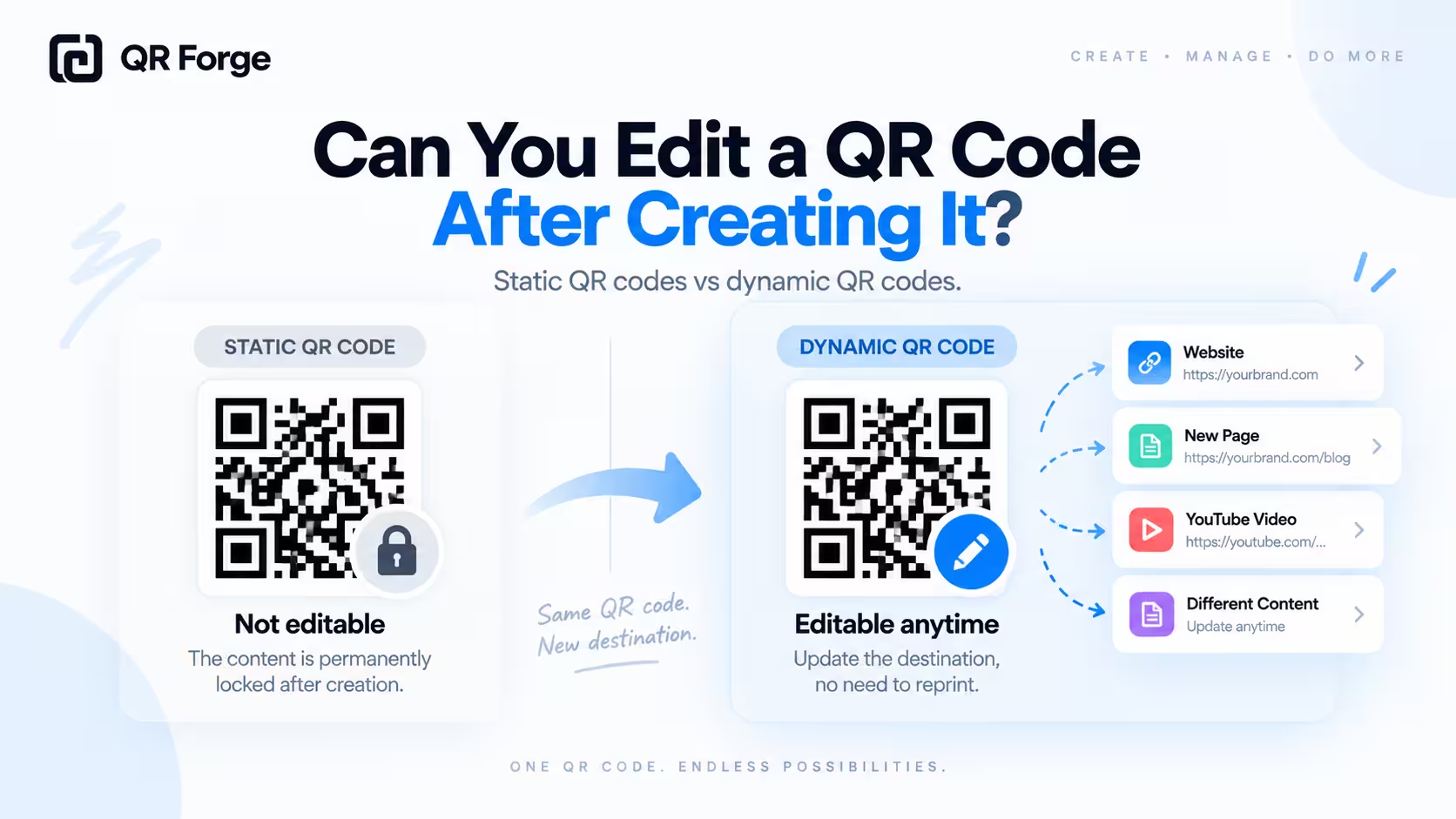
A QR code can look permanent once it has been generated, but whether you can change it later depends on one important detail: is it static or dynamic?
A static QR code stores its final data directly inside the QR pattern. That means you cannot edit the encoded URL, phone number, WiFi password, contact details, or text after the code has been created.
A dynamic QR code works differently. It usually contains a redirect URL controlled by a QR platform, which can allow the final destination to be changed without replacing the printed QR code.
This guide explains exactly what you can edit, what you cannot edit, and what to do if you already printed a QR code with outdated or incorrect information.
Create a new static QR code
Generate a direct QR code for a website, text, WiFi network, or contact information without a forced tracking redirect.
Can you edit a QR code after creating it?
Sometimes.
The answer depends on how the QR code was created.
Static QR code
A static QR code contains the final data directly.
For example, if you create a QR code for:
https://example.com/menu
that URL becomes part of the QR pattern.
You cannot later change it to:
https://example.com/new-menu
without creating a new static QR code.
Dynamic QR code
A dynamic QR code usually contains a provider-managed redirect URL.
The visible QR pattern can remain the same while the provider changes where that redirect sends the user.
Static QR codes cannot be edited after creation because the final data is encoded directly into the pattern. Dynamic QR codes may allow destination changes because they use a redirect service.
Why static QR codes cannot be edited
A static QR code is a visual encoding of specific data.
The pattern represents the data
The dark and light modules are calculated from the content you entered.
Changing the content changes the encoded information.
New data usually means a new pattern
If you change a URL, phone number, WiFi password, contact field, email address, or plain text, you normally need to generate a new QR code.
The image is not a remote file
A static QR code does not call back to the generator to ask what it should contain.
Once downloaded, it works independently.
What can you edit in a dynamic QR code?
Dynamic QR codes usually let you edit the destination behind the code.
Destination URL
You may be able to change:
https://example.com/page-a
to:
https://example.com/page-b
while keeping the same printed QR pattern.
Campaign destination
A marketing campaign can redirect the same code to different landing pages over time.
Provider settings
Depending on the service, you may also be able to change campaign labels, analytics settings, or other account-level configuration.
Can you change a QR code link after printing?
For a static QR code, no.
The printed pattern already contains the original URL.
Static printed QR code
Printed QR code -> Encoded URL -> Destination
There is nothing remotely editable in the middle.
Dynamic printed QR code
Printed QR code -> Provider redirect -> Destination
The provider can change the final destination while the printed code remains unchanged.
What if you printed the wrong URL?
Option 1: Create a new QR code
If the QR code is static and the URL is wrong, generate a new code with the correct address.
Option 2: Redirect the old URL
If the QR code points to a URL on a website you control, you may be able to redirect the old address to the correct page.
https://example.com/old-page
-> https://example.com/new-page
Option 3: Cover the old code
For posters, menus, packaging prototypes, or small print batches, you may be able to place a new QR sticker over the incorrect code.
Make sure the old pattern is fully covered.
Why your own domain can make static QR codes more flexible
A static QR code cannot be edited, but a URL you control can often be redirected.
Example
You create a static QR code pointing to:
https://yourdomain.com/menu
Later, your menu moves to:
https://yourdomain.com/menu-2027
You can keep /menu working and redirect it to the new page.
The QR code remains unchanged
The static QR code still contains the original /menu URL.
Your website controls what that URL does.
Can you edit a QR code design after creating it?
You can redesign and regenerate a QR code, but you are creating a new image.
Colors
You may generate another version using different colors.
Logo
You may add or remove a logo.
Size
You can export the QR code at a different size or file format.
Always retest
Any visual modification should be tested again.
Can you resize an existing QR code?
Yes, but resize carefully.
Vector files
SVG is useful when you need to scale a QR code without losing sharpness.
Raster files
PNG can work well if the original resolution is large enough.
Avoid stretching
Keep the QR code square.
Preserve the quiet zone
Do not crop away the empty margin around the pattern.
For sizing guidance, see QR code size guide.
Can you edit a WiFi QR code?
A static WiFi QR code cannot be updated after generation.
Password changed?
Generate a new WiFi QR code.
Network renamed?
Generate a new code with the new SSID.
Can you edit a vCard QR code?
A static vCard QR code cannot update itself.
Contact fields are encoded
The code may contain your name, phone number, email address, company, job title, website, and address.
Changed job or phone number?
Create a new vCard QR code with the new details.
Read how to create a vCard QR code for more guidance.
Can you edit a WhatsApp QR code?
A static WhatsApp QR code normally contains a WhatsApp URL.
Phone number change
A new number requires a new static QR code.
Message change
If the code contains a pre-filled message, changing that message also requires a new static code.
Can you edit a text QR code?
No.
Plain text is stored directly in a static QR code.
If the text is wrong or outdated, create a new code.
Can you edit a QR code after downloading it?
You can edit the image visually, but that does not safely change the encoded content.
Image editing is not data editing
Changing pixels in an image editor does not replace the encoded URL with a new URL.
It usually damages the QR code instead.
Regenerate instead
If the underlying information needs to change, use a QR generator to create a new code.
Can you edit a QR code inside Canva or another design tool?
You can change the surrounding design, but not the encoded destination of a static QR image.
Things you can change around it
You can adjust:
- card layout
- background
- text
- call to action
- surrounding icons
- placement
Be careful when changing the QR image
Do not stretch it, crop the quiet zone, cover finder patterns, reduce contrast, or place it on a busy background.
Need a new destination?
Generate a new QR code and replace the old image in the design.
Static QR code vs dynamic QR code for editing
Static QR code
Best when:
- destination is stable
- you do not need analytics
- you want direct encoding
- you want no provider dependency
- you do not expect frequent changes
Dynamic QR code
Useful when:
- destination changes frequently
- the same printed code must be reused
- campaign analytics are required
- you accept dependency on the provider
For the full comparison, see static vs dynamic QR codes.
Should you use a dynamic QR code just because it is editable?
Not necessarily.
Provider dependency
The QR code relies on the redirect service continuing to operate.
Subscription dependency
Some platforms require an active plan.
Analytics and privacy
Dynamic services may collect scan data depending on the provider.
Static can be simpler
If the destination is permanent, a static QR code may be easier and more predictable.
How to avoid needing to edit a QR code later
Verify the destination
Open every URL manually before generating the QR code.
Scan before printing
Test the generated code on multiple phones.
Use stable URLs
Avoid temporary page paths for permanent materials.
Control the domain
A URL under your own domain gives you the option to maintain redirects later.
Avoid temporary contact details
Do not print a large batch using a phone number or email address that will change soon.
Print a proof first
Test the actual printed version before mass production.
What to check before mass printing
Destination check
Confirm:
- URL spelling
- HTTPS
- correct page
- mobile layout
- phone number
- WiFi credentials
- contact details
QR design check
Confirm:
- strong contrast
- enough quiet zone
- correct proportions
- readable size
- no blur
Real-world test
Scan on iPhone and Android, from a realistic distance, under typical lighting, and from the final printed proof.
What if the destination changes later?
You control the URL
Maintain the old URL and redirect it to the new page.
You do not control the URL
You may need to replace the static QR code.
You used a dynamic QR platform
Update the destination through the provider if your account still supports it.
The data is not a URL
For WiFi, contact data, text, or phone numbers, generate a new static QR code.
How QR Forge approaches editable vs static QR codes
QR Forge focuses on simple, direct static QR generation.
Direct data encoding
Basic QR codes store the final data directly.
No forced redirect layer
QR Forge does not need to route every scan through a tracking URL for basic generation.
No account required
You can generate a basic static QR code without creating an account.
Editing means regenerating
If the data changes, generate a new QR code with the updated information.
QR code editing checklist
Destination
- Will the URL change often?
- Do I control the domain?
- Can I maintain redirects?
- Is the information permanent?
Printing
- Will this be printed once or repeatedly?
- Is replacing the code easy?
- Will thousands of copies be produced?
- How long will the material remain in use?
Features
- Do I need analytics?
- Do I need destination editing?
- Am I comfortable depending on a provider?
- Do I need a simple direct static code instead?
Can you edit a QR code after creating it? Final answer
A static QR code cannot be edited after it is created because its final data is encoded directly into the QR pattern.
If the URL, WiFi password, contact details, phone number, or text changes, you normally need to generate a new static QR code.
A dynamic QR code may allow destination changes because it uses a provider-managed redirect.
For long-term static QR codes, one practical strategy is to use a stable URL on a domain you control. If the final page moves later, you can maintain the original URL and redirect it without changing the printed QR code.
Create a new QR code
Generate a direct static QR code in your browser with no login, no watermark, and no forced tracking redirect.