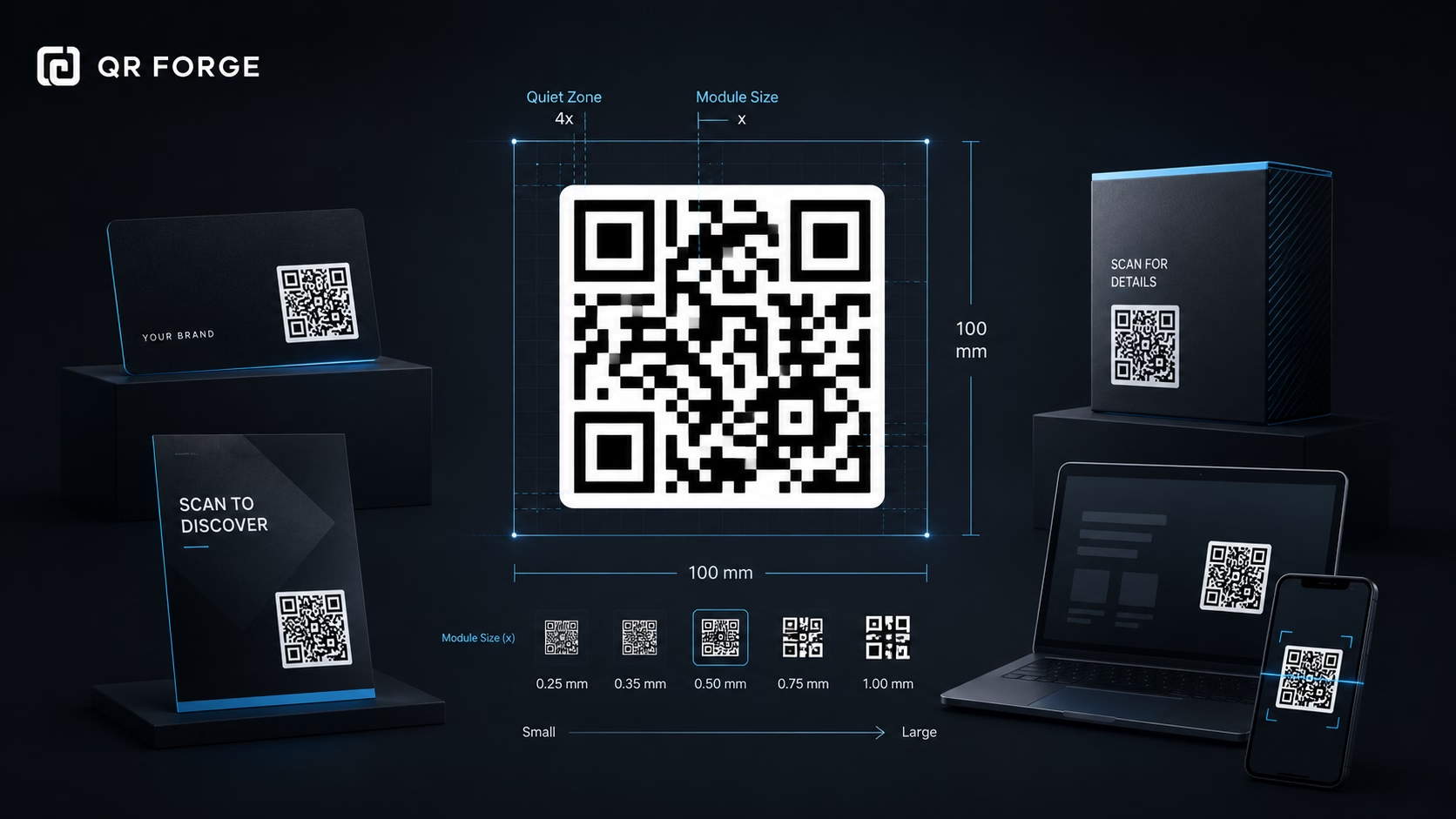
QR code size matters more than many people expect.
A QR code can be technically valid but still difficult to scan if it is printed too small, placed too far away, compressed badly, or surrounded by a busy design. The right size depends on where the QR code appears and how people will scan it.
This guide explains practical QR code sizing for business cards, flyers, posters, packaging, menus, digital screens, and other common use cases.
Create a clean QR code
Generate a high-contrast QR code, then use this guide to choose the right size for print or digital use.
Why QR code size matters
A QR code needs to be large enough for a phone camera to detect its pattern clearly.
If the code is too small, the scanner may struggle to read the modules, corners, and quiet zone. This becomes more noticeable when the QR code is printed, viewed from a distance, or placed on a textured surface.
Small QR codes are harder to scan
A small QR code gives the camera less detail to work with.
This can cause problems when:
- the phone camera is older
- the lighting is poor
- the print quality is low
- the QR code is compressed
- the user scans from a distance
- the QR code is placed on curved material
- the design has low contrast
Bigger is not always better
A larger QR code is usually easier to scan, but it still needs good placement and design.
A large QR code can fail if it has poor contrast, no quiet zone, a broken URL, or a design that covers important parts of the pattern.
The basic QR code sizing rule
The farther away someone scans, the larger the QR code should be.
A small QR code can work on a business card because the user scans it closely. A QR code on a poster or banner needs to be bigger because people may scan it from several feet or meters away.
Simple distance rule
A practical rule is:
QR code size should increase as scanning distance increases.
For close-up use, a small QR code may be fine. For wall signs, posters, banners, and displays, use a larger QR code.
Test in the real environment
The best sizing rule is always testing.
A QR code that works on your laptop screen may fail when printed small on matte paper, glossy packaging, or a distant poster.
Recommended QR code sizes
There is no single perfect size for every QR code. Still, these practical recommendations are useful starting points.
Minimum size for print
For many printed materials, avoid going below:
2 x 2 cm
or around:
0.8 x 0.8 inches
This is a practical minimum for close-range scanning, such as business cards or small labels.
Better size for general print
For flyers, menus, brochures, and handouts, a safer size is often:
3 x 3 cm to 5 x 5 cm
This gives users more scanning flexibility.
Larger size for distance scanning
For posters, signs, banners, and wall displays, use a much larger QR code.
The more distance between the user and the QR code, the larger it should be.
If people will scan the QR code while standing, walking, or viewing from a distance, make the code larger than you think. Small QR codes are one of the most common causes of scan failure.
QR code size for business cards
Business cards are usually scanned at close range, so the QR code does not need to be huge.
However, business cards also have limited space, which can tempt people to make the QR code too small.
Recommended business card size
For business cards, aim for at least:
2 x 2 cm
or:
0.8 x 0.8 inches
If your card layout allows it, slightly larger is better.
Best placement on a business card
Place the QR code where it has enough breathing room.
Good options include:
- back side of the card
- lower corner with enough margin
- dedicated contact section
- near a short call to action
Avoid crowded layouts
Do not place the QR code too close to text, logos, borders, or decorative elements.
A business card is small, so preserving white space is important.
QR code size for flyers
Flyers are usually held by hand, so people scan them from close to medium distance.
A flyer QR code should be larger than a business card QR code because the design often includes more visual elements around it.
Recommended flyer size
For flyers, a good starting point is:
3 x 3 cm to 5 x 5 cm
Use the larger end if the flyer is visually busy or if the QR code is important to the campaign.
Add a clear call to action
A flyer should not show a QR code without context.
Use short text such as:
- Scan to register
- Scan to view the offer
- Scan to download the guide
- Scan to visit the website
- Scan to contact us
Test after printing
Flyers are often printed in bulk. Always print one test copy and scan the QR code before sending the final file to print.
QR code size for posters
Posters need larger QR codes because people may scan them from a distance.
A QR code that works on a flyer may be too small on a poster.
Recommended poster size
For posters, the right size depends on distance.
A small poster viewed up close may only need a medium QR code. A wall poster viewed from several feet away needs a larger one.
Think about scanning distance
Ask where the viewer will stand when scanning.
If people scan from across a room, the QR code must be large. If the poster is on a table or notice board, it can be smaller.
Keep the QR code visible
Do not hide the QR code near the bottom edge, in a crowded corner, or inside complex graphics.
For posters, visibility is part of usability.
QR code size for menus
Menu QR codes are usually scanned at close range, but they need to work quickly for many users.
Restaurants, cafes, food trucks, and events should prioritize clarity.
Recommended menu size
For printed menus, table cards, or table tents, use at least:
3 x 3 cm
A larger size may be better for table tents or wall menus.
Place it where users expect
Good placements include:
- table tent
- menu cover
- receipt holder
- counter sign
- table sticker
- entrance sign
Avoid glossy glare
Glossy lamination or reflective surfaces can make scanning harder.
If possible, test the QR code under real lighting conditions.
QR code size for packaging
Packaging QR codes can be tricky because packages may be small, curved, textured, glossy, or handled roughly.
The QR code needs to survive real-world use.
Recommended packaging size
For small product packaging, avoid going below:
2 x 2 cm
For larger packaging, use more space if available.
Watch for curved surfaces
QR codes printed on bottles, jars, tubes, and curved packages can distort when viewed from an angle.
If the surface is curved, make the QR code larger and test it on the actual packaging shape.
Avoid folds and seams
Do not place QR codes across folds, seams, edges, or areas that may be bent or damaged.
A QR code should stay flat and readable.
QR code size for digital screens
QR codes on screens are usually easier to adjust because you can control the display size.
Still, they need to be readable from the expected viewing distance.
Presentation slides
For slides, make the QR code large enough that people in the back of the room can scan it.
Place it on a clean area with enough contrast.
Event screens
For event displays, conference screens, and digital signage, the QR code should be large and visible for enough time.
Do not show it too briefly.
Websites and apps
If a QR code appears on a website or app, make sure it is large enough on mobile and desktop screens.
Also include a clickable link when possible.
QR code size and scanning distance
Scanning distance is one of the most important sizing factors.
A QR code used at close range can be much smaller than one scanned from across a room.
Close-range scanning
Close-range scanning includes:
- business cards
- small labels
- product inserts
- table menus
- receipts
- brochures
These can use smaller QR codes if the print quality and contrast are good.
Medium-distance scanning
Medium-distance scanning includes:
- flyers on walls
- counter signs
- table tents
- classroom materials
- event signs
These should use larger QR codes for better reliability.
Long-distance scanning
Long-distance scanning includes:
- posters
- banners
- stage screens
- billboards
- large signage
These need much larger QR codes and very clear placement.
QR code size and data density
Not all QR codes have the same visual density.
A QR code with a short URL is usually simpler than a QR code with a very long URL or a lot of text.
Dense QR codes need more space
A dense QR code has smaller modules and more visual detail. This can make it harder to scan when printed small.
Dense QR codes often happen when encoding:
- very long URLs
- long plain text
- large contact details
- long pre-filled messages
- complex data strings
Use shorter data when possible
If you are creating a URL QR code, use a clean and stable URL.
A shorter URL can make the QR pattern less dense and easier to scan.
Do not sacrifice privacy unnecessarily
Short links can reduce QR density, but they also add another dependency. For privacy-first static QR codes, using the final URL directly may be better when the URL is not too long.
QR code quiet zone and size
The quiet zone is the empty space around a QR code.
It is part of the scannable design, not optional decoration.
Why the quiet zone matters
The quiet zone helps phone cameras separate the QR code from surrounding text, images, borders, and backgrounds.
Without enough quiet zone, the scanner may not recognize the QR code correctly.
Do not crop the quiet zone
When resizing or placing a QR code into a design, do not crop too close to the pattern.
Leave clear space around all four sides.
Count the quiet zone as part of the design
When planning QR code size, include the quiet zone in the final visual area.
A QR code that technically fits but has no surrounding margin may still fail.
QR code size and image format
The file format can affect how clean the QR code looks after resizing or printing.
PNG
PNG is a good choice for most digital and simple print uses. It keeps sharp edges and does not introduce the same compression artifacts as JPEG.
SVG
SVG is useful for design workflows because it scales cleanly without becoming blurry.
If you need to resize the QR code in a design tool, SVG is often the best choice.
JPEG
JPEG is not ideal for QR codes because compression can blur edges and create artifacts.
If you must use JPEG, export at high quality and test carefully.
WebP and AVIF
WebP and AVIF can be useful for web performance, but for direct QR code export and print workflows, PNG or SVG are usually safer.
QR code size for print quality
Print quality affects how small you can safely make a QR code.
A high-quality print can support smaller details than a low-quality print.
Check resolution
Avoid stretching a low-resolution QR code image.
If the QR code becomes blurry or pixelated, scanning may fail.
Avoid heavy compression
Do not compress QR code images aggressively.
The pattern needs sharp edges.
Print a proof
Before printing many copies, print a proof and scan it.
This is especially important for business cards, packaging, menus, stickers, and flyers.
QR code design mistakes that affect size
Some design choices make a QR code harder to scan even when the size looks reasonable.
Low contrast
Light colors, gradients, and busy backgrounds reduce scan reliability.
Use strong contrast between the QR code and background.
Too much decoration
Logos, icons, shapes, and custom styling can make a QR code look nice, but they can also interfere with scanning.
Keep decoration minimal.
Cropped edges
Cropping the QR code or quiet zone can make the code fail.
Always keep the full QR code visible.
Poor placement
A QR code placed near folds, seams, corners, or curved surfaces may be harder to scan.
Good placement is part of good sizing.
Practical QR code size checklist
Before publishing or printing, check the QR code in context.
Check the environment
Ask:
- Where will the QR code appear?
- How far away will people scan it?
- Will it be printed or displayed on a screen?
- Will the surface be flat, glossy, curved, or textured?
- Will lighting conditions be good or poor?
Check the design
Confirm that:
- the QR code has strong contrast
- the quiet zone is preserved
- the size matches scanning distance
- the destination is correct
- the call to action is clear
- the file format is suitable
- the image is not blurry
Check the final version
Always test the final version, not only the design preview.
If the QR code will be printed, test a printed copy.
Recommended sizes by use case
Use this table as a practical starting point.
| Use case | Suggested size | Notes |
|---|---|---|
| Business card | 2 x 2 cm or larger | Close-range scanning |
| Small product label | 2 x 2 cm or larger | Test print quality carefully |
| Flyer | 3 x 3 cm to 5 x 5 cm | Add a clear call to action |
| Brochure | 3 x 3 cm or larger | Keep enough white space |
| Restaurant menu | 3 x 3 cm or larger | Test under real lighting |
| Table tent | 4 x 4 cm or larger | Easy for guests to scan |
| Poster | Larger based on distance | Do not hide it in a corner |
| Banner | Much larger | Design for long-distance scanning |
| Presentation slide | Large and high contrast | Keep visible long enough |
| Packaging | Depends on surface | Avoid curves, seams, and folds |
Treat these as starting points
These sizes are not strict rules. They are starting points.
The final size should be based on the real scanning distance, surface, print quality, and design layout.
How to test QR code size
Testing is the only way to know whether your QR code size works in the real world.
Test on multiple devices
Use more than one phone if possible.
Test with:
- iPhone camera
- Android camera
- newer devices
- older devices
- different lighting conditions
Test from realistic distance
Do not test only from very close range if users will scan from farther away.
Stand where the real user will stand and scan from there.
Test after printing
If the QR code will be printed, test the printed version.
Screen testing is not enough for print.
Create QR codes at the right size
A QR code should be easy to scan, easy to notice, and easy to understand.
The right size depends on the scanning distance, print quality, surface, contrast, quiet zone, and amount of encoded data.
Final checklist
Before publishing your QR code, confirm that:
- the QR code is large enough
- the quiet zone is preserved
- the contrast is strong
- the image is sharp
- the destination works
- the code is tested on phones
- the printed version scans
- the placement matches the scanning distance
- the call to action is clear
Good QR code sizing is not about making every code huge. It is about making the code easy to scan in the place where people will actually use it.
Create a clean QR code with QR Forge
Generate a privacy-first QR code, download it, and use this size guide to place it correctly on print or digital materials.