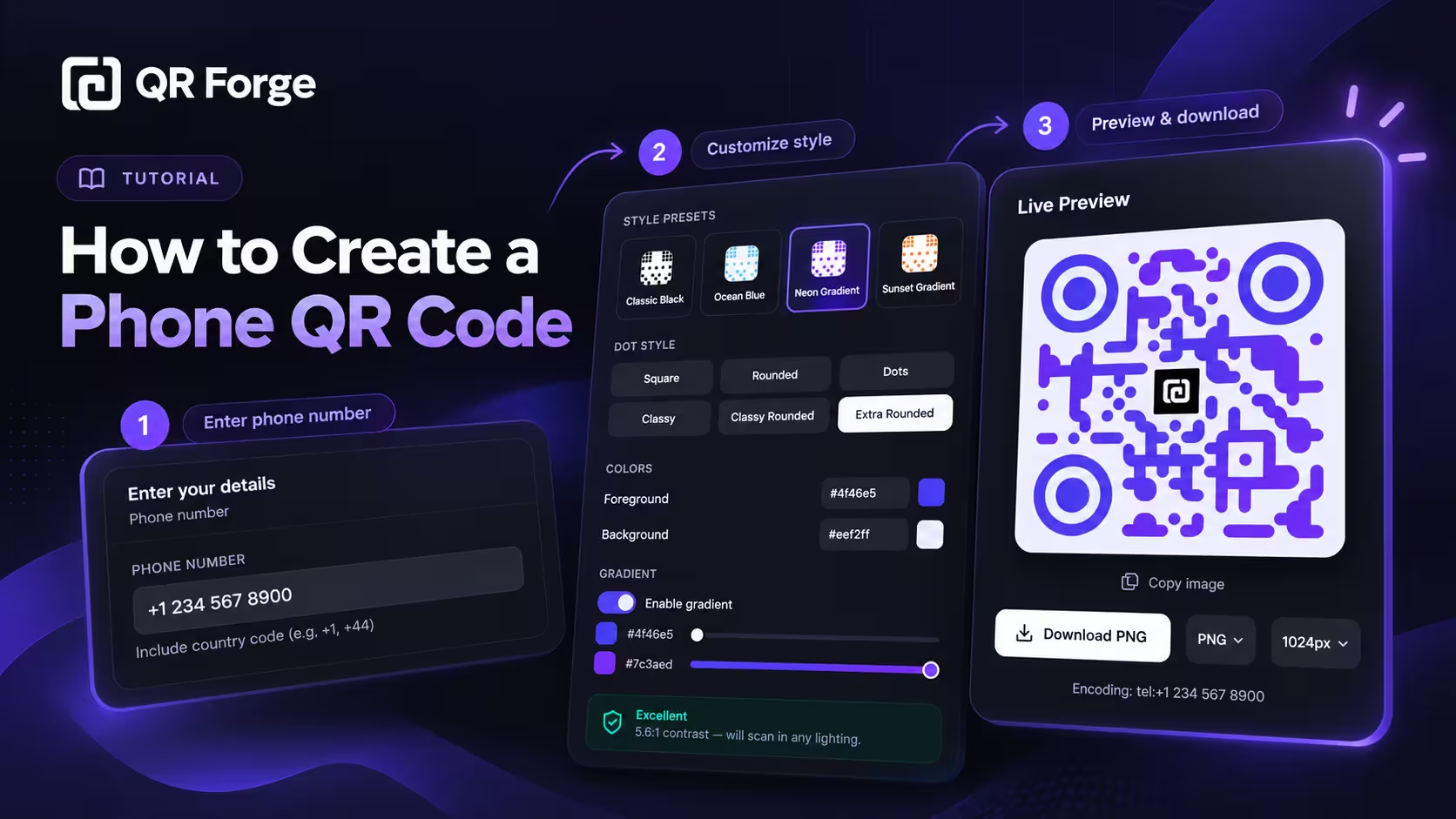
A phone QR code makes it easier for someone to call a phone number without typing it manually.
When scanned on a compatible smartphone, the QR code can prepare a call action with the number already filled in. The user can then review the number and decide whether to place the call.
Phone QR codes are useful for customer service, storefronts, business cards, event signage, product packaging, emergency contacts, property listings, advertisements, and other places where a direct phone call is the intended next step.
Create a phone QR code
Generate a static QR code that opens a phone call action on a compatible device.
What is a phone QR code?
A phone QR code is a QR code that contains a telephone action.
It usually uses a tel link
A simple telephone action can look like:
tel:+621234567890
When a compatible smartphone recognizes this format, it can offer to open the dialer with the number already prepared.
The number is encoded directly
For a static phone QR code, the phone number becomes part of the QR payload.
The user remains in control
Scanning the code should not silently place a call.
The phone normally gives the user a chance to confirm the action.
A phone QR code is a shortcut to a call action. It should prepare the phone number for the user, not place a call without confirmation.
How to create a phone QR code in QR Forge
QR Forge includes Phone as one of its QR Content Types, so you can prepare the call action, preview the QR code, customize the style, and export it from one screen.
Step 1: Choose Phone in QR Content Type
Open the main generator and select Phone in QR Content Type.
QR Forge uses the same generator structure for multiple content types, but when you switch to Phone, the input area changes to a phone-specific form.
Step 2: Enter the phone number
In the Enter your details panel, fill in the PHONE NUMBER field.
The current UI also reminds users to include the country code, with helper text like:
Include country code (e.g. +1, +44)
A sample number in the interface looks like:
+1 234 567 8900
If this QR code may be used by international visitors or customers, keeping the number in international format is the safest choice.
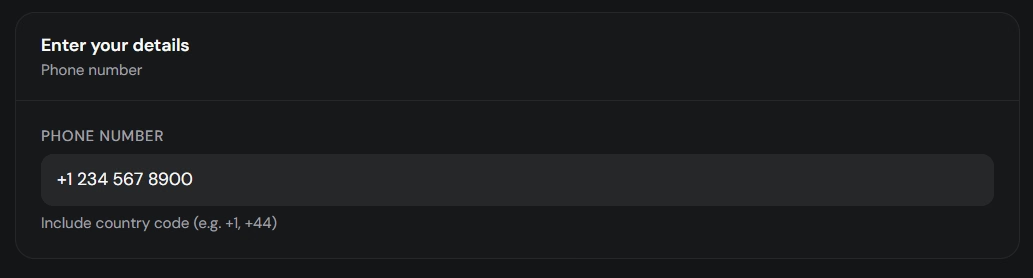
Enter the phone number in international format so the QR code works more reliably across devices and countries.
Step 3: Review style presets
Below the form, QR Forge provides multiple working areas such as:
- Style
- Logo
- Size & QR
- Templates
- Batch
- Tools
There is also a Randomize option.
Inside the Style tab, QR Forge includes Style Presets such as:
- Classic Black
- Soft Rounded
- Ocean Blue
- Neon Gradient
- Corporate Dark
- Minimal Light
- Sunset Gradient
- Tech Purple
These presets are useful if you want a faster starting point before adjusting the QR details manually.
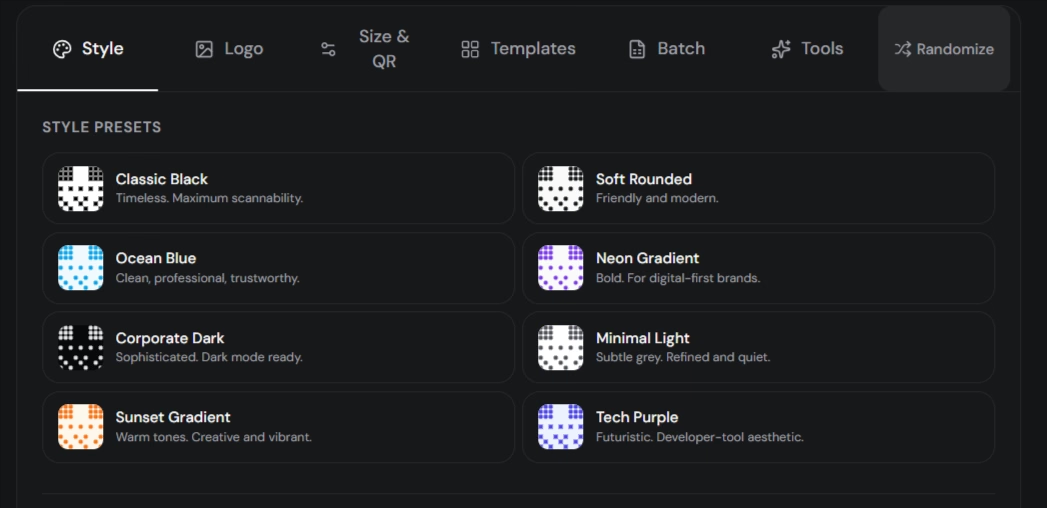
Style presets give you a quick visual starting point before you fine-tune the QR code.
Step 4: Customize dots, corners, colors, and gradients
The Style tab also includes more detailed customization controls.
The current interface shows Dot Style options such as:
- Square
- Rounded
- Dots
- Classy
- Classy Rounded
- Extra Rounded
It also includes Corner Square and Corner Dot controls.
For colors, the current example uses:
- foreground:
#4f46e5 - background:
#eef2ff
The same panel also includes:
- Transparent background for PNG
- Enable gradient
- gradient type controls such as Linear and Radial
- gradient stop controls
- a contrast result panel
In the example interface, QR Forge shows an Excellent result with a 5.6:1 contrast rating and also notes:
Logo detected — use H error correction.
That is a helpful reminder that styling should still protect scanability.
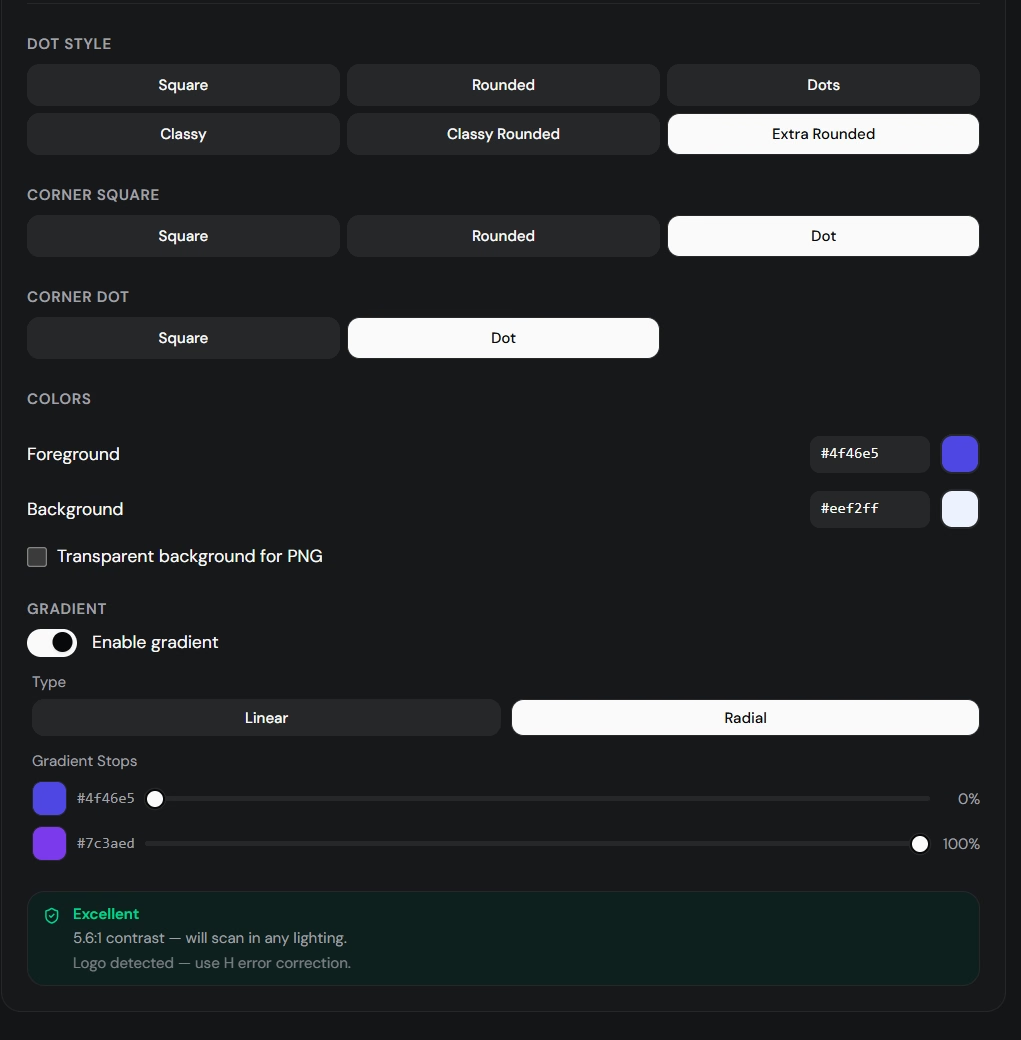
Customize the QR code carefully. Visual styling is useful, but scan reliability matters more than decoration.
If the QR code will be used in print, keep a strong contrast ratio, avoid over-styling, and always test the final exported file before publishing it.
Step 5: Check the Live Preview
Use the Live Preview panel to review the final QR code.
The current example preview shows:
- the styled QR code
- the QR Forge logo placed in the center
- Copy image
- Download PNG
- output format selector
- output size selector
- the encoded action shown below the preview
In the example shown, the encoding text is:
tel:+1 234 567 8900
This makes it easier to verify that the QR code is preparing the expected telephone action.
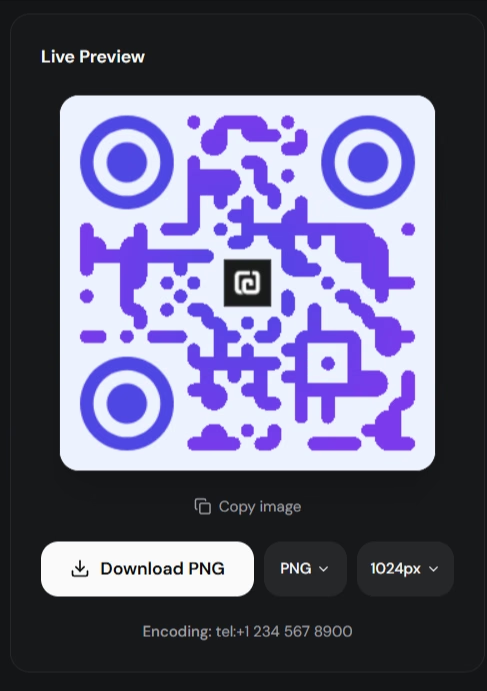
Always review the live preview and the encoded action before exporting the final QR code.
Step 6: Download the QR code
Use the download button in the Live Preview panel.
Review the selected format and output size before exporting.
Choose a size that matches where the QR code will be used, especially if it will appear on posters, signs, packaging, or cards.
Step 7: Test the exported QR code
After downloading, scan the final file with a phone and confirm that:
- the correct number appears
- the dialer opens
- the country code is correct
- the user can still cancel before placing the call
If the QR code will be printed, test the printed version too.
How a phone QR code works
The QR code stores a telephone action as encoded data.
Basic example
tel:+621234567890
The scanner decodes the payload
A phone camera or QR scanner reads the QR pattern and reconstructs the tel action.
The operating system recognizes the phone number
The device may then offer to open the dialer.
The user confirms the call
The user decides whether to continue.
Does a phone QR code call automatically?
Normally, no.
Scanning is not the same as calling
The phone first decodes the number.
The dialer may open
The device can prepare the call action.
User confirmation matters
The user should still control whether the call is actually placed.
Should you use the country code?
In most public use cases, yes.
International format reduces ambiguity
A local number may not be interpreted correctly on every device.
Better for international visitors
Tourists, customers, or partners from another country can use the same code more reliably.
Example
Instead of:
0812...
prefer:
+62812...
when the number is intended to be used internationally.
Phone QR code vs plain text phone number
A phone number can also be stored as plain text.
Plain text QR code
The scanner may simply display:
+621234567890
The user may need to copy the number manually.
Phone QR code
The device recognizes the payload as a telephone action and can offer to open the dialer.
Use the specialized type for calling
If the goal is to make a phone call, Phone is the better content type.
Phone QR code vs SMS QR code
These QR codes target different actions.
Phone QR
Best when the user should call.
SMS QR
Best when the user should send a text message.
Choose the intended behavior
Do not use a phone QR code when your real goal is messaging.
Phone QR code vs WhatsApp QR code
Phone and WhatsApp QR codes can contain the same underlying business number but lead to different experiences.
Phone QR
Opens the dialer.
WhatsApp QR
Opens WhatsApp and may prepare a message.
Use Phone for voice calls
This is useful for urgent support, bookings, reception, or direct sales calls.
Use WhatsApp for chat
This works better when users need asynchronous conversation.
Phone QR code vs vCard QR code
A vCard is designed for contact saving.
Phone QR code
Main action:
Call this number
vCard QR code
Main action:
Save this contact
A vCard can include a phone number, but it is more useful when you want to share a complete contact profile.
Read how to create a vCard QR code.
Do phone QR codes work without internet?
The QR code itself can be scanned offline.
The number is stored directly
The scanner does not need to contact a website just to recover the number.
Calling depends on service
A normal telephone call requires cellular service or another calling method available on the device.
WiFi calling can behave differently
If the user relies on WiFi calling or another online calling service, connectivity requirements depend on that service.
For the broader explanation, read do QR codes work without internet.
Do phone QR codes expire?
A static phone QR code does not expire because of time.
The phone number must remain active
If the number is disconnected or reassigned, the QR code still points to the old number.
Printed codes remain static
They cannot automatically update themselves when the number changes.
New number means new QR code
Generate a new static QR code if the business changes phone numbers.
Can you edit a phone QR code later?
Not if it is static.
The number is encoded directly
Changing the phone number changes the payload.
A new payload needs a new QR code
If the number changes, create another QR image.
Read can you edit a QR code after creating it.
Phone QR codes for customer support
A phone QR code can reduce friction for people who need immediate help.
Product packaging
Place the code near support information.
Manuals
Add it to troubleshooting or warranty sections.
Service counters
Let customers open the dialer without typing a long number.
Use a dedicated business line
A stable support number is better than a personal employee number.
Phone QR codes for restaurants and hospitality
Hotels, restaurants, and venues can use phone QR codes for direct communication.
Reception
A QR code can call the front desk.
Reservations
A restaurant can provide a call shortcut for booking.
Room service
A hotel can use a phone QR code for service requests.
Keep visible text too
Do not hide the phone number only inside the QR code.
Users should still be able to read it manually.
Phone QR codes for real estate
Property listings often depend on direct contact.
For-sale signs
A phone QR code can open the agent's number.
Flyers
The QR code can sit next to property details.
Open-house materials
Visitors can quickly call the agent.
Use a business number
Avoid exposing a personal private number unnecessarily.
Phone QR codes for business cards
A business card can include a direct call action.
Add a call to action
For example:
Scan to call
Do not replace visible contact details
The phone number should still appear in normal text when practical.
Consider vCard for broader contact sharing
If you also want to share email, company, website, and job title, vCard may be better.
Phone QR codes for posters and flyers
Printed marketing can use a phone QR code when calling is the main conversion goal.
Good examples
- Scan to call sales
- Scan to reserve
- Scan to book
- Scan for support
- Scan to contact us
Place the code near the call to action
The QR code and explanation should visually belong together.
Phone QR codes for emergency information
A QR code can supplement emergency contact information.
Keep the number visible
Critical phone numbers should not be hidden only behind a QR code.
QR should be a convenience layer
Not the only source of essential information.
Phone QR code privacy
The encoded phone number is not secret.
Anyone can scan it
A public QR code can expose the number to anyone who sees it.
Use a business line when possible
This is better for public materials.
Avoid personal private numbers
Especially on posters, packaging, websites, public signs, and event materials.
Phone QR code security
A phone QR code is not a security mechanism.
The number can be copied
A QR pattern can be photographed and decoded later.
Caller verification still matters
If a phone interaction involves sensitive information, use normal authentication procedures.
How to make a phone QR code easy to scan
Keep the payload simple
A phone number is naturally compact, which helps.
Use strong contrast
Dark modules on a light background are a reliable default.
Preserve the quiet zone
Leave clear space around the QR pattern.
Keep the code large enough
The appropriate size depends on scanning distance.
Avoid distortion
Do not stretch the QR code into a rectangle.
Test after customization
Logos, colors, and styling should always be retested.
How to test a phone QR code
Test on iPhone
Scan the QR code and check the dialer.
Test on Android
Repeat the process.
Verify every digit
A single incorrect digit can send callers to the wrong number.
Check international format
Make sure the country code is correct.
Test the final export
Do not rely only on the generator preview.
Test the printed copy
If the QR code will appear on a business card, poster, sign, or package, scan the real print.
Common phone QR code mistakes
Missing country code
This can create problems for international users.
Wrong digit
A small typo can point to another person.
Personal number used publicly
Use a business line when possible.
No call to action
People may not understand what the QR code does.
Printing too small
The user should be able to scan quickly.
Over-customizing
Decorative styling can reduce reliability.
No cross-device testing
Always test multiple devices before large-scale printing.
Good calls to action for phone QR codes
Examples include:
- Scan to call
- Scan to contact us
- Scan to call support
- Scan to reserve
- Scan to book
- Scan to speak with sales
- Scan to call reception
The wording should match the number that opens.
How QR Forge handles phone QR codes
QR Forge includes Phone as a QR Content Type.
Static generation
The telephone action is encoded into the QR code.
No account required
Basic supported QR generation does not require signup.
No forced tracking redirect
A static phone action does not need to pass through a QR Forge redirect.
Live Preview
The main generator lets you review the QR code before exporting it.
Customization tools
You can style the QR code while keeping scanning reliability in mind.
Phone QR code checklist
Phone number
- number is correct
- country code is correct
- business line is appropriate
- number is expected to remain active
QR design
- strong contrast
- readable size
- quiet zone preserved
- no distortion
- styling remains scan-friendly
Testing
- tested on iPhone
- tested on Android
- correct dialer action opens
- every digit is correct
- final export works
- printed version works
How to create a phone QR code: final answer
The basic workflow is:
Choose Phone
-> Enter the phone number
-> Use international format
-> Review Live Preview
-> Customize if needed
-> Download
-> Scan and verify the dialer
A phone QR code is useful when the desired next action is a direct call.
Use a stable business number, include the country code when appropriate, keep the design easy to scan, and verify the final code on multiple phones before printing or publishing it.
Create your phone QR code
Generate a static phone QR code directly in your browser with no login or watermark.